📌 Jump to Section
Remington Gail + KrutiDev Font
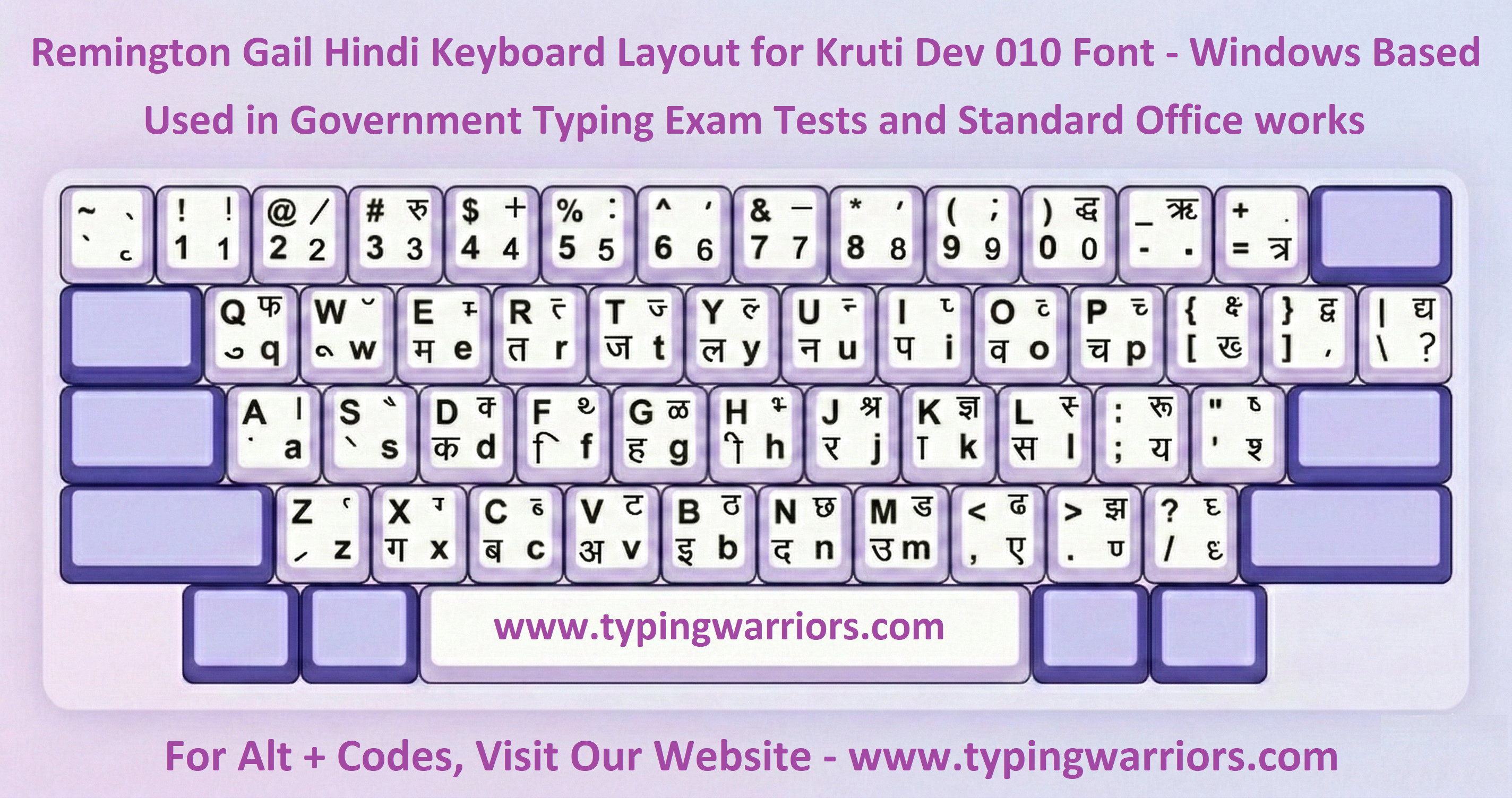
The Remington Gail keyboard layout paired with KrutiDev font is the oldest and most widely adopted Hindi typing standard in India. Derived from mechanical Hindi typewriters of the mid-20th century, each physical key maps to a fixed ASCII character that renders as a Hindi glyph only when KrutiDev (or Devlys) font is applied. It is a non-Unicode, ASCII-based encoding system — text is stored as English ASCII but displayed as Hindi through the font's internal glyph mapping.
🔑 How it works
When you press a key (e.g., D), the system types ASCII "D", which KrutiDev renders as Hindi character ड. The mapping is static — no IME required — so KrutiDev works natively in offline exam environments.
Platform
Windows XP / 7 / 10 / 11
Encoding Type
ASCII (Non-Unicode / Legacy)
Speed Potential
Very High (40–60+ WPM possible)
Learning Curve
Steep — requires memorization
Primary Use
State courts, offline govt. offices
Setup Required
Install KrutiDev 010 font only
📋 Exams Requiring Remington Gail + KrutiDev
| Exam / Recruitment | Conducting Body | Required Speed | Notes |
|---|---|---|---|
| UPSSSC Junior Assistant | UPSSSC, Uttar Pradesh | 25 WPM Hindi | KrutiDev Remington layout; backspace not allowed |
| Rajasthan High Court LDC | HCRAJ | 35 WPM Hindi | Remington Gail / KrutiDev; very strict evaluation |
| RSMSSB / RSSB LDC | RSMSSB, Rajasthan | 25 WPM Hindi | KrutiDev / Devlys font; Remington layout |
| Bihar Beltron DEO / Jr. Clerk | BELTRON, Bihar | 30 WPM Hindi | Remington (KrutiDev); offline exam software |
| MP / CG District Court — Clerk | State High Courts | 30 WPM Hindi | Legacy KrutiDev used in older exam slots |
| Rajasthan Patwari / Info. Asst. | RSMSSB | 20–25 WPM | Remington Gail KrutiDev / Devlys |
Remington Gail + Mangal Font (Unicode)
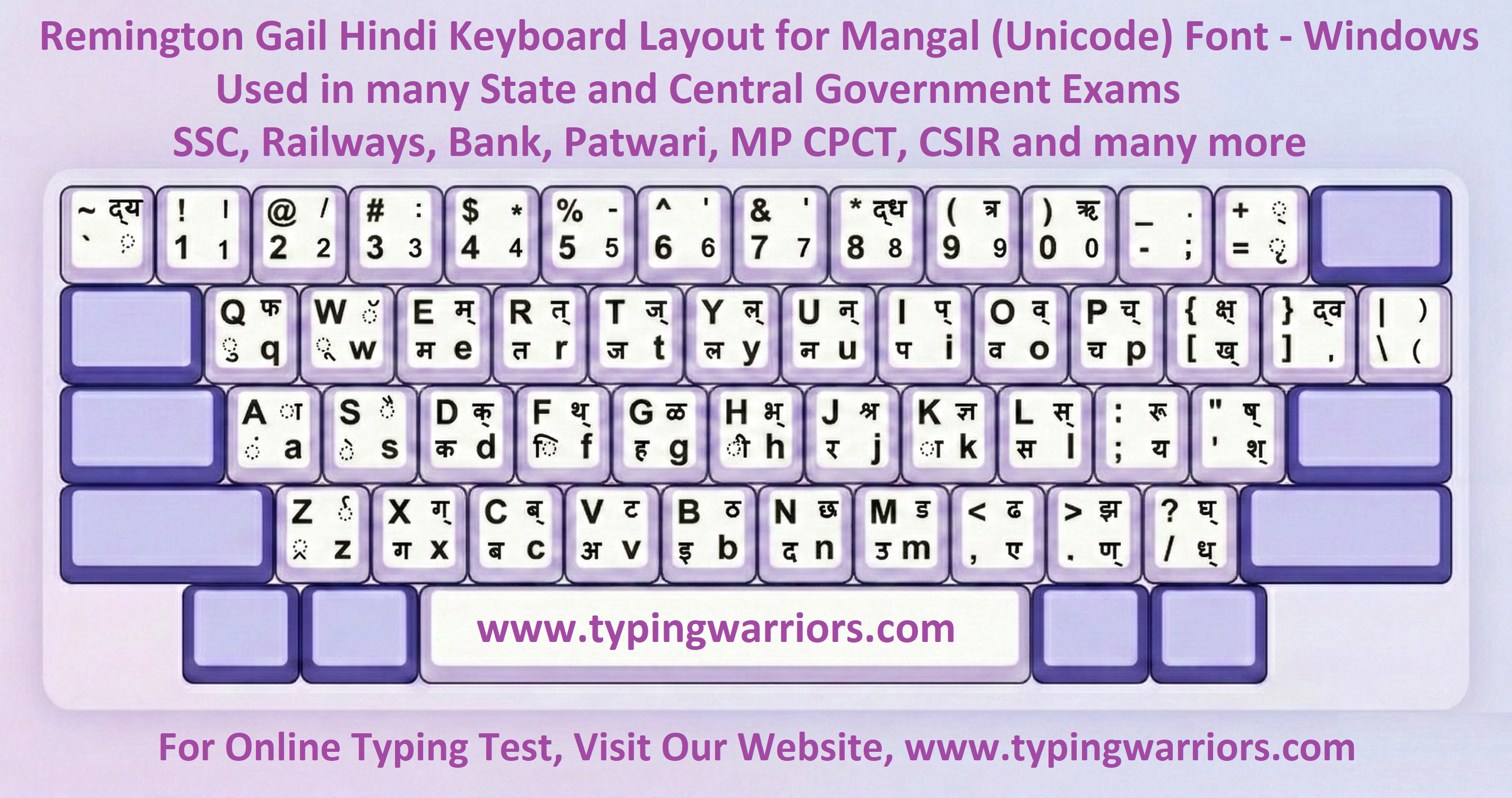
The Remington Gail layout combined with the Mangal Unicode font represents the modern evolution of the traditional typewriter layout. It preserves familiar key positions — accessible to typists trained on KrutiDev — while encoding text in true Unicode (UTF-8). Characters are machine-readable, searchable, and copy-paste compatible. The Indian Government officially adopted Mangal as the standard Unicode Hindi font for central government work, making this the primary requirement for most central government typing exams including SSC and CPCT.
🌐 Unicode Advantage
Unlike KrutiDev, Mangal text is stored as genuine Hindi Unicode characters (U+0900–U+097F Devanagari block) — compatible with all modern databases, websites, government portals, and mobile devices. Text can be searched, indexed, emailed, and published without any font dependency.
Platform
Windows 7 / 10 / 11 (with Indic Input)
Encoding Type
Unicode (UTF-8 / Devanagari block)
IME Required
Microsoft Indic Input 3 (Remington GAIL)
Font Used in Exam
Mangal / Aparajita / Arial Unicode MS
Speed Potential
High (30–50 WPM with practice)
Backspace Policy
Allowed in SSC; restricted in CPCT
📋 Exams Requiring Remington Gail + Mangal Unicode
| Exam | Conducting Body | Hindi Speed | Notes |
|---|---|---|---|
| MP CPCT | MPESB / NIC, Madhya Pradesh | 20 NWPM Hindi | Remington Gail or Inscript; Mangal Unicode; strict backspace rules; required for most MP govt jobs |
| SSC CHSL (LDC / DEO / PA / SA) | Staff Selection Commission | 35 WPM Hindi = 10,500 KDPH | Mangal font; Remington Gail or Inscript (candidate's choice) |
| SSC CHSL DEO / DEO Grade-A (Data Entry Skill Test) | Staff Selection Commission | 8,000 KDPH C&AG / Culture: 15,000 KDPH | English data entry; 15 min; ~2000–4000 key depressions; English QWERTY |
| SSC CGL (Tax Asst, DEO Grade A) | Staff Selection Commission | 35 WPM Hindi | Mangal Unicode; Remington Gail layout |
| SSC Stenographer (Gr. C & D) | Staff Selection Commission | 80/100 WPM dictation | Transcription in Mangal Remington Gail; 50/65 min test |
| RRB NTPC (Jr. Clerk cum Typist) | Railway Recruitment Board | 30 WPM Hindi | Mangal Unicode; Remington Gail preferred |
| CRPF / CISF / BSF (HC Ministerial) | MHA / Respective Force HQ | 25–30 WPM Hindi | Mangal Unicode; Remington Gail layout |
| FCI — Typist / Jr. Clerk | Food Corporation of India | 30 WPM Hindi | Mangal Remington Gail; Unicode typing |
| UP Police Computer Operator | UPPRPB, Uttar Pradesh | 25 WPM Hindi | Mangal / KrutiDev; Remington Gail |
Remington Gail m17n — Ubuntu Linux Keyboard Layout
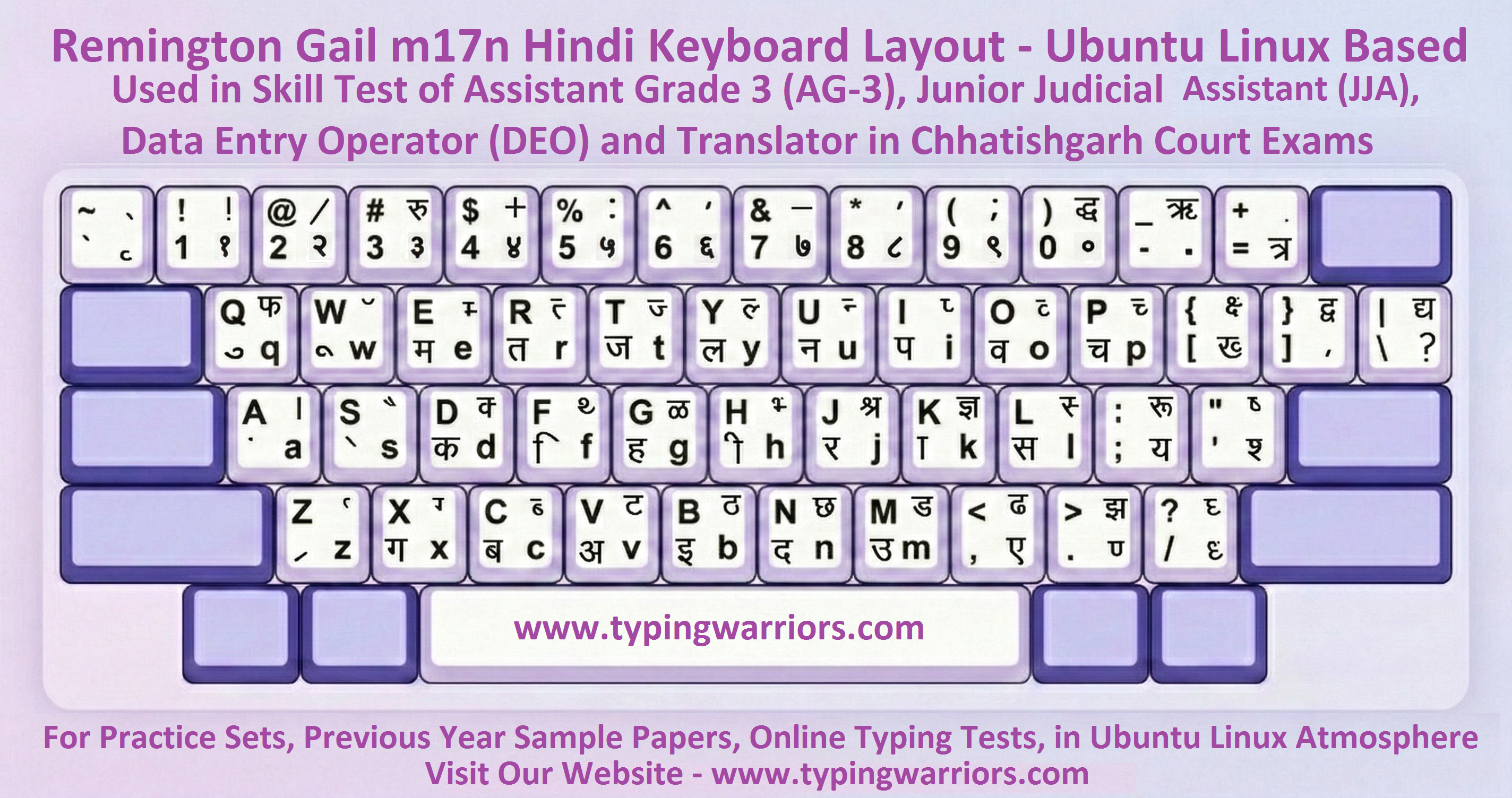
The Remington Gail m17n keyboard layout is one of the two official Hindi typing input methods used in Chhattisgarh High Court, District Courts, and Session Courts typing skill tests — running exclusively on Ubuntu Linux workstations via the IBus-m17n framework. This layout is specifically used for the posts of Assistant Grade 3 (AG-3), Junior Judicial Assistant (JJA), Data Entry Operator (DEO), and Translator in CG court examinations. Unlike its Windows Remington Gail counterpart (which uses Microsoft Indic Input 3 with Mangal font), the m17n variant operates through GNU's multilingual input engine — producing Unicode Devanagari output in LibreOffice Writer on Linux without any Windows-style IME tray. Candidates familiar only with Windows-based Mangal typing will find key behaviour and input feedback subtly different; dedicated Ubuntu practice on TypingWarriors is therefore essential.
🐧 Remington Gail m17n vs. Windows Mangal — Key Differences
Both use the familiar Remington Gail key positions, so the physical key-to-character mapping feels identical. However, on Ubuntu Linux the input is handled by the GNU m17n-db hi-remington input method loaded through IBus. This means: (1) there is no separate IME mode indicator in the taskbar as on Windows; (2) the half-form and matra composition timing may differ slightly; (3) the word processor is LibreOffice Writer, not MS Word. Candidates preparing only on Windows Indic Input 3 face a genuine disadvantage because the Ubuntu terminal environment, font rendering, and keyboard shortcut set all differ.
⚠️ Why This Layout Cannot be Replicated on Windows
The Chhattisgarh government standardized its court offices on Ubuntu Linux to eliminate software licensing costs and improve system security. The hi-remington.mim file from the GNU m17n-db package is a Linux-exclusive input definition — there is no direct equivalent application on Windows that replicates the exact keypress-to-Unicode composition behaviour of IBus-m17n. TypingWarriors is one of the very few platforms in India that simulates this exact Linux-based Remington Gail m17n environment in the browser.
Platform
Ubuntu Linux (LTS versions)
Input Framework
IBus + m17n-db (hi-remington.mim)
Word Processor
LibreOffice Writer
Encoding
Unicode (Devanagari UTF-8)
Install Command
sudo apt install ibus-m17n m17n-db
Windows Equivalent
No exact equivalent — Linux-exclusive
📋 CG Court Posts Requiring Remington Gail m17n (Ubuntu Linux)
| Post / Exam | Conducting Body | Required Speed | Environment |
|---|---|---|---|
| CG High Court — Junior Judicial Assistant (JJA) | Chhattisgarh High Court | 5000 KDPH / 25 WPM Hindi 8000 KDPH / 30 WPM English | Ubuntu Linux + LibreOffice + Remington Gail m17n / Vedmata m17n |
| CG High Court — Assistant Grade 3 (AG-3) | Chhattisgarh High Court | 5000 KDPH / 25 WPM Hindi | Ubuntu Linux + LibreOffice + Remington Gail m17n |
| CG High Court — Data Entry Operator (DEO) | Chhattisgarh High Court | 5000–8000 KDPH | Ubuntu Linux + LibreOffice + Remington Gail m17n |
| CG High Court — Translator | Chhattisgarh High Court | 5000 KDPH Hindi | Ubuntu Linux + LibreOffice + Remington Gail m17n |
| CG District Courts — Clerk / Steno | CG District Judiciary | 5000–8000 KDPH | Ubuntu Linux + LibreOffice + Remington Gail m17n |
| CG Session Courts — Computer Operator / DEO | Session Courts, CG | 5000 KDPH Hindi | Ubuntu Linux; Remington Gail m17n IBus |
| CG Vyapam — Assistant Grade-3 (AG-3) | CG Vyapam / CGPSC | 5000 KDPH Hindi | Ubuntu Linux; LibreOffice Writer; Remington Gail m17n |
🔑 How to Install Remington Gail m17n on Ubuntu Linux
On Ubuntu 20.04 / 22.04 / 24.04, open a terminal and run:
sudo apt update && sudo apt install ibus ibus-m17n m17n-db
ibus restart
# Then go to: Settings → Region & Language → Input Sources → Add → Hindi (Remington Gail m17n)
After installation, switch input using Super + Space (or the IBus indicator in the top-right). Open LibreOffice Writer and begin typing — the m17n engine handles all Devanagari composition automatically.
Ubuntu Linux — Vedmata (m17n) Keyboard Layout
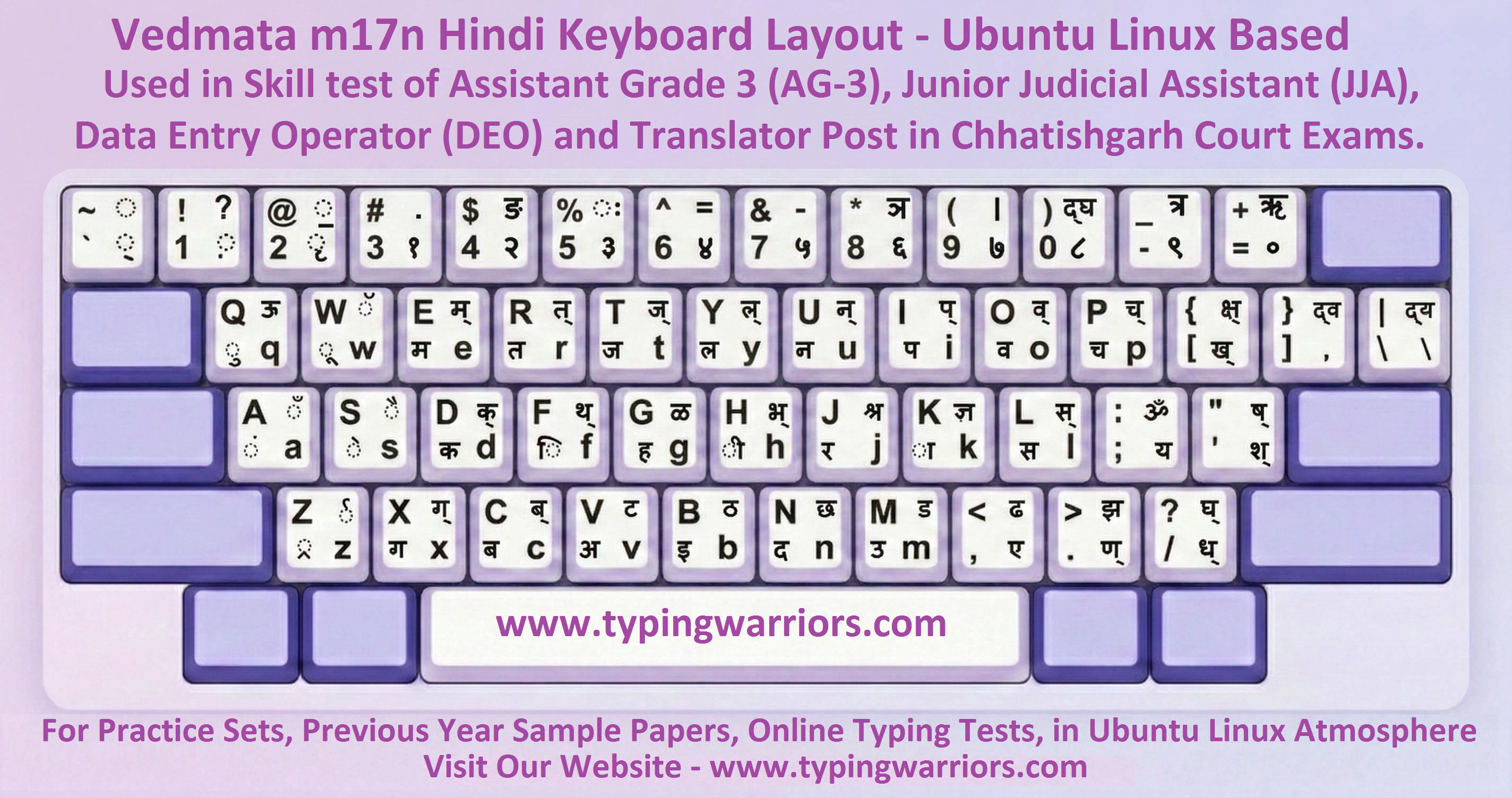
The Vedmata keyboard layout is the second Hindi Unicode input method used in CG court examinations — delivered through the IBus-m17n framework on Ubuntu Linux. Named after the Vedmata font family bundled with Ubuntu's Indian language support packages, it operates exclusively within a Linux environment. Like Remington Gail m17n, it is used in typing skill tests for AG-3, JJA, DEO, and Translator posts in the CG High Court, District Courts, and Session Courts. While both Remington Gail m17n and Vedmata m17n are used in CG exams, the key-to-character mappings differ — candidates must confirm which layout their specific exam notice specifies, and practise both to be safe.
🐧 Why Ubuntu Linux for CG Exams?
The Chhattisgarh government standardized its courts and administrative offices on Ubuntu Linux to reduce software licensing costs and improve security. Candidates trained only on Windows face a significant disadvantage — the keyboard behaviour, IME interface, and LibreOffice shortcuts all differ from Microsoft Word on Windows. Both Vedmata m17n and Remington Gail m17n are used across different CG court exam rounds; TypingWarriors provides dedicated practice simulators for each.
Platform
Ubuntu Linux (LTS versions)
Input Framework
IBus + m17n-db + ibus-m17n
Word Processor
LibreOffice Writer
Encoding
Unicode (Devanagari UTF-8)
Install Command
sudo apt install ibus-m17n
Windows Equivalent
None — Linux-exclusive layout
📋 Exams Requiring Vedmata (m17n) on Ubuntu Linux
| Post / Exam | Conducting Body | Required Speed | Environment |
|---|---|---|---|
| CG High Court — JJA | Chhattisgarh High Court | 5000 KDPH / 25 WPM Hindi 8000 KDPH / 30 WPM English | Ubuntu Linux + LibreOffice + Vedmata m17n |
| CG District Courts — Steno / Clerk | CG District Judiciary | 5000–8000 KDPH | Ubuntu Linux + LibreOffice + Vedmata / Remington Gail m17n |
| CG Session Courts — DEO | Session Courts, CG | 5000 KDPH Hindi | Ubuntu Linux; Vedmata m17n IBus |
| CG Vyapam — Assistant Grade-3 (AG-3) | CG Vyapam / CGPSC | 5000 KDPH Hindi | Ubuntu Linux; LibreOffice Writer; Vedmata m17n |
| CG Govt. Offices — Computer Operator | Various CG Departments | 5000 KDPH Hindi | Ubuntu Linux; Vedmata / Remington Gail Unicode |
⚠️ Important: KDPH vs WPM
CG court exams measure speed in KDPH (Keystrokes per Hour). The official requirement for CG High Court JJA is 5000 KDPH in Hindi (equivalent to 25 WPM) and 8000 KDPH in English (equivalent to 30 WPM). Practise in KDPH-measured environments — WPM-only practice may not match the exact keystroke-counting method used in exams.
English Standard Keyboard Layout (QWERTY)
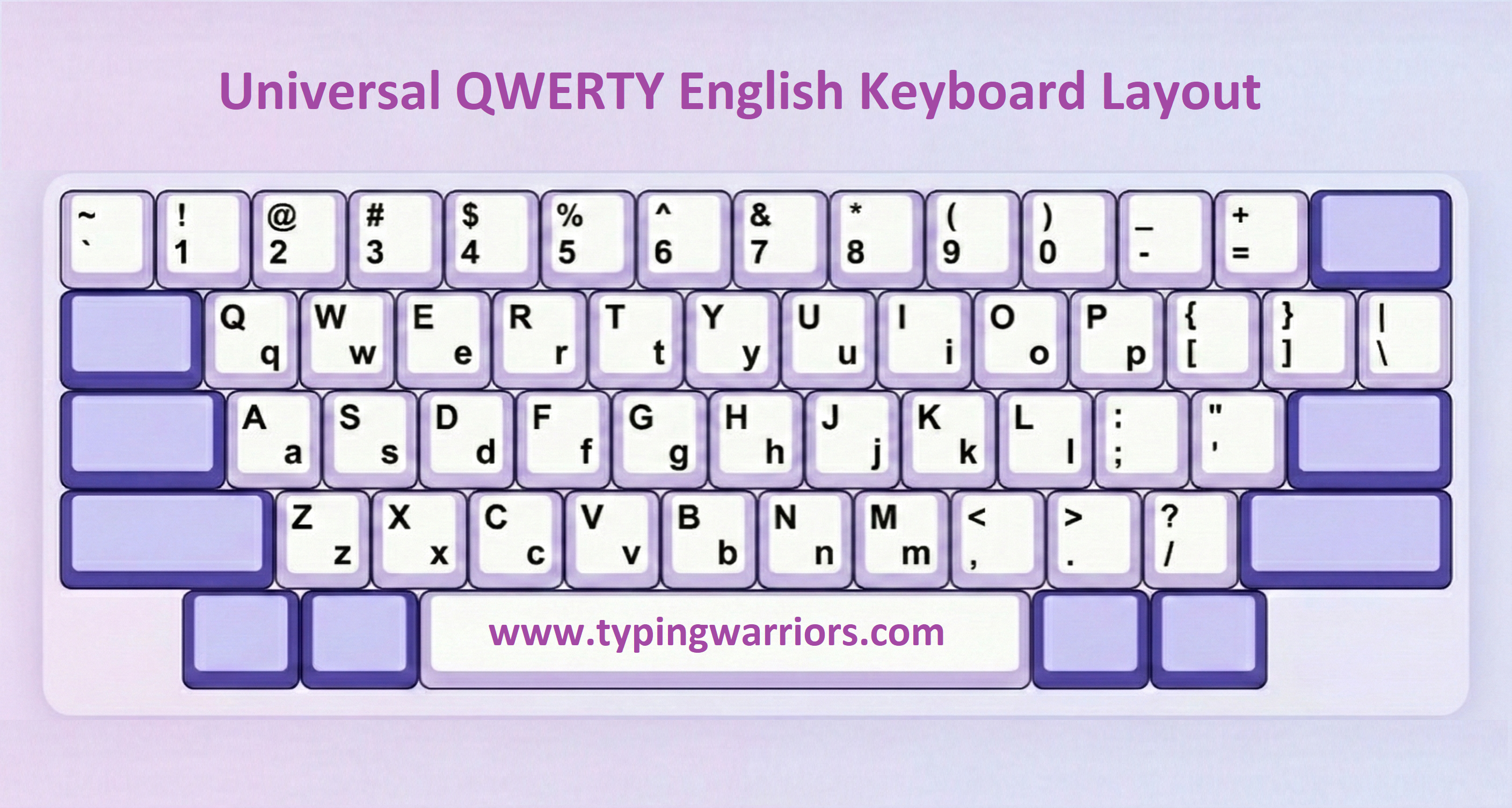
The English Standard QWERTY keyboard layout is the universal arrangement used for English typing in all government examinations. It is the default layout on every Windows and Linux system — no additional software or font installation required. English typing speed is measured in WPM and is a mandatory skill component in SSC, RRB, Banking, Insurance, and many state-level government recruitments. Mastering touch typing using all ten fingers is essential to achieving high WPM scores consistently under timed exam conditions.
🎯 Touch Typing — The Exam Edge
Touch typing means typing without looking at the keyboard using muscle memory. Home row keys (ASDF JKL;) serve as the anchor position for all fingers. Consistent touch typing practice with correct finger placement is the single most effective way to push English speed beyond 40 WPM — the standard qualifying threshold for most central government typing posts.
Platform
All — Windows, Linux, macOS
Encoding
ASCII / Unicode (Latin)
IME Required
None — system default
Speed Target
35–40 WPM for govt exams
Learning Curve
Moderate — touch typing needed
Setup Required
No setup — use as-is
📋 Exams Requiring English Typing (QWERTY Layout)
| Exam | Conducting Body | English Speed | Notes |
|---|---|---|---|
| SSC CHSL (LDC / DEO / PA / SA) | Staff Selection Commission | 35 WPM | 10-min typing test; QWERTY; backspace allowed |
| SSC CGL (DEO Grade A / Tax Asst.) | Staff Selection Commission | 35 WPM = 10,500 KDPH | Skill test on computer; QWERTY; 2000 key depressions/hr |
| RRB NTPC (Jr. Clerk / Commercial Apprentice) | Railway Recruitment Board | 30 WPM | Typing test on computer; QWERTY standard |
| MP CPCT (English Component) | MPESB / NIC, Madhya Pradesh | 30 WPM | English typing on QWERTY; alongside Hindi component |
| CG High Court JJA (English Component) | Chhattisgarh High Court | 8000 KDPH / 30 WPM | On Ubuntu Linux; LibreOffice Writer; QWERTY |
| Banking — IBPS / SBI PO / Clerk | IBPS / SBI | 40+ WPM | Online CBT; QWERTY; speed & accuracy assessed |
| Insurance — LIC AAO / Assistant | LIC of India | 30–35 WPM | Descriptive English typing component; QWERTY |
| CRPF / CISF / BSF (HC Ministerial) | MHA / Respective Force HQ | 35 WPM | English typing alongside Hindi; QWERTY |
Which Layout for Which Exam?
This consolidated reference table helps you quickly identify the correct keyboard layout, font, and operating system required for every major government exam in India that mandates a typing test component.
| Exam | Layout | Font | OS | Type |
|---|---|---|---|---|
| MP CPCT | Remington Gail / Inscript | Mangal | Windows | Unicode |
| SSC CHSL | Remington Gail / Inscript | Mangal | Windows | Unicode |
| SSC CHSL DEO Data Entry Skill Test | QWERTY (English) | — | Windows | 8K–15K KDPH |
| SSC CGL | Remington Gail / Inscript | Mangal | Windows | Unicode |
| SSC Steno | Remington Gail / Inscript | Mangal | Windows | Unicode |
| RRB NTPC | Remington Gail | Mangal | Windows | Unicode |
| CRPF / CISF / BSF | Remington Gail | Mangal | Windows | Unicode |
| CG High Court JJA | Remington Gail m17n / Vedmata m17n | Unicode (Devanagari) | Ubuntu Linux | 5000 KDPH / 25 WPM Hindi 8000 KDPH / 30 WPM English |
| CG High Court AG-3 / DEO / Translator | Remington Gail m17n | Unicode (Devanagari) | Ubuntu Linux | 5000 KDPH / 25 WPM Hindi |
| CG District Courts | Remington Gail m17n / Vedmata m17n | Unicode (Devanagari) | Ubuntu Linux | Linux Unicode |
| CG AG-3 / Vyapam | Remington Gail m17n / Vedmata m17n | Unicode (Devanagari) | Ubuntu Linux | Linux Unicode |
| Raj. High Court LDC | Remington Gail | KrutiDev / Devlys | Windows | Legacy ASCII |
| UPSSSC Jr. Assistant | Remington Gail | KrutiDev | Windows | Legacy ASCII |
| Bihar Beltron DEO | Remington Gail | KrutiDev | Windows | Legacy ASCII |
| FCI Typist | Remington Gail | Mangal | Windows | Unicode |
| IBPS / SBI Banking | QWERTY (English) | System Default | Windows | English |
Choosing the Right Layout for You
Understanding the fundamental differences between these five keyboard systems helps you make an informed decision about which layout to learn and practise — based on your target exam, operating system, and career goals.
🟡 KrutiDev (Legacy)
- ASCII-based, no IME needed
- Works offline without extra software
- Best for UP, Bihar, Rajasthan state exams
- Cannot be used on modern web platforms
- Text not searchable / copy-paste breaks
🟢 Mangal (Unicode)
- Unicode — future-proof standard
- Requires Indic Input 3 (IME)
- Best for SSC, CPCT, Railways, Central Govt
- Text is searchable and portable
- Familiar Remington key positions retained
🔵 Remington Gail m17n (Ubuntu Linux)
- Linux-exclusive (Ubuntu + IBus-m17n)
- Unicode output via GNU m17n-db hi-remington.mim
- Required for CG High Court AG-3, JJA, DEO, Translator
- Familiar Remington key positions on Linux
- Cannot substitute Windows Mangal Remington Gail
🔵 Vedmata m17n (Linux)
- Linux-exclusive (Ubuntu + IBus)
- Unicode output via m17n framework
- Essential for CG High Court / AG-3 exams
- Requires Ubuntu Linux practice environment
- Cannot substitute Windows-based layouts
⚪ English (QWERTY)
- Universal — all systems and platforms
- No IME or font installation required
- Required for SSC, RRB, Banking, Insurance
- Touch typing is the key skill to develop
- 35–40 WPM is the standard qualifying speed